











USB-C Power Delivery 3.1 vs. 3.0: Best Guide for 240W Charging

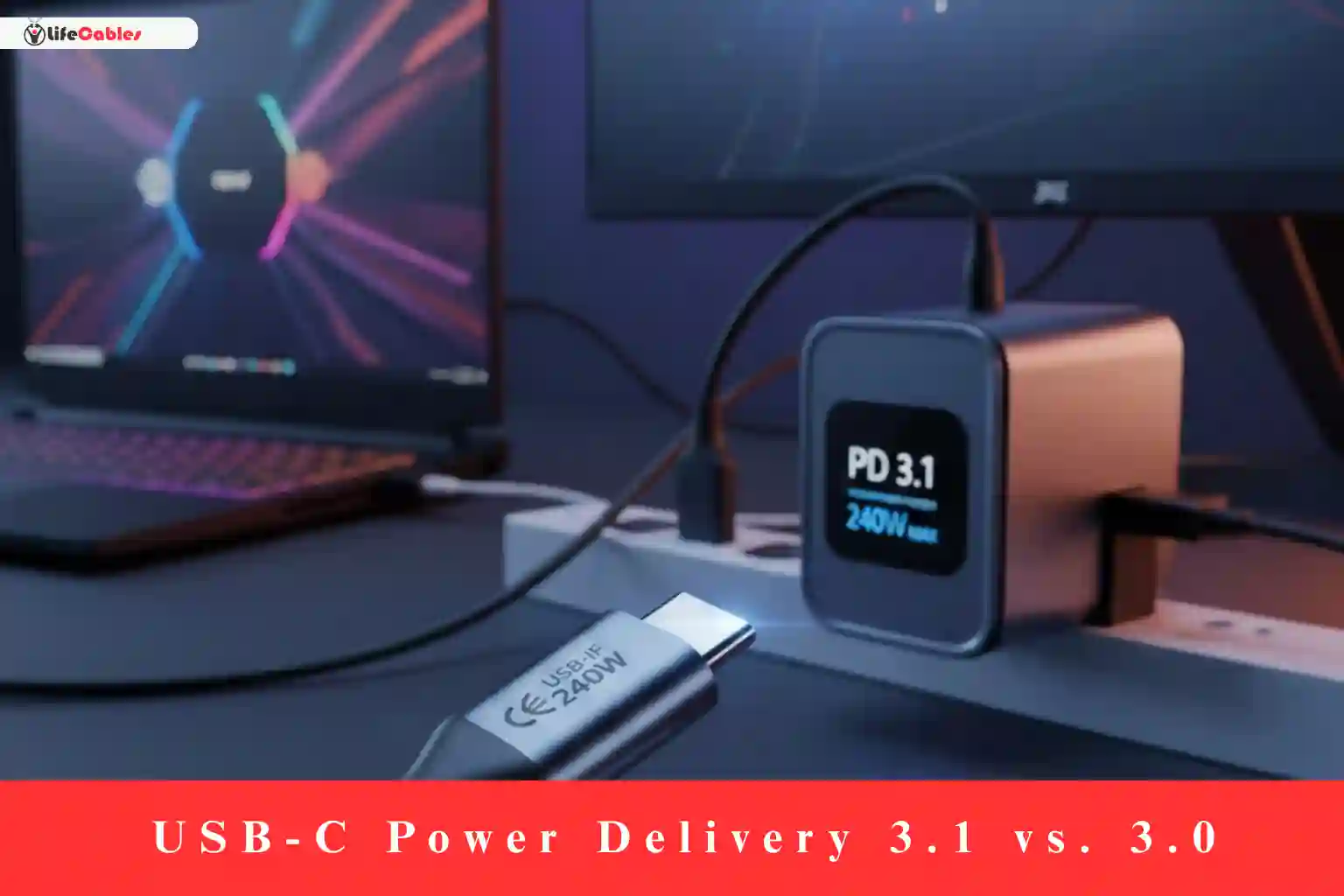
If you’ve recently looked for a new laptop charger or a high-end USB-C cable, you’ve likely seen the term “PD 3.1” splashed across product boxes alongside a massive 240W promise.
For years, we were told that 100W was the “ceiling” for USB-C. It was enough for a MacBook Air or a Dell XPS, but if you had a beefy gaming laptop or a creative workstation, you still had to lug around those giant, heavy “brick” chargers with proprietary pins.
That has finally changed. The jump from USB-C Power Delivery (PD) 3.0 to 3.1 isn’t just a minor incremental update—it’s a complete overhaul of how much energy a tiny USB port can handle.
In this guide, we’ll break down exactly what changed, why that “240W” number matters, and whether you actually need to upgrade your gear today.
The Evolution: From 100W to 240W
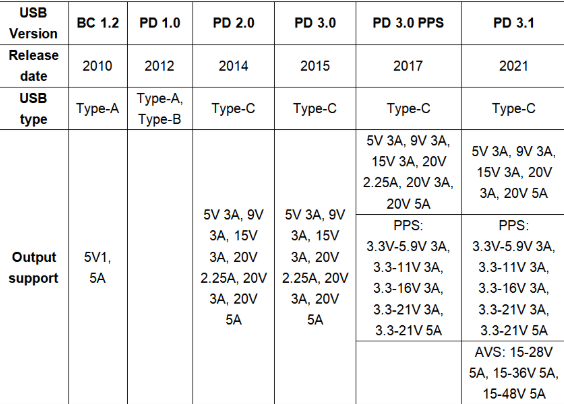
To understand the difference, we have to look at the math. Under the USB PD 3.0 standard (often called “Standard Power Range” or SPR), the maximum voltage was capped at 20V. Since USB-C cables are generally limited to 5 Amps of current for safety reasons, the maximum power was a simple calculation:
$$20V \times 5A = 100W$$
While 100W is plenty for smartphones and ultra-portable laptops, it couldn’t touch the 180W or 230W requirements of a high-performance gaming rig.
USB PD 3.1 introduces something called Extended Power Range (EPR). Instead of being stuck at 20V, the new standard adds three new fixed voltage levels: 28V, 36V, and 48V.
By pushing the voltage up to 48V while keeping the current at 5A, we get the new maximum:
$$48V \times 5A = 240W$$
Key Technical Differences: PD 3.0 vs. PD 3.1
Beyond just the raw wattage, there are technical “under the hood” changes that affect how your devices stay cool and safe.
| Feature | USB PD 3.0 (SPR) | USB PD 3.1 (EPR) |
| Max Power Output | 100W | 240W |
| Max Voltage | 20V | 48V |
| New Voltage Steps | N/A | 28V, 36V, 48V |
| Voltage Negotiation | PPS (Programmable Power Supply) | AVS (Adjustable Voltage Supply) |
| Primary Target | Phones, Tablets, Ultrabooks | Gaming Laptops, Monitors, E-bikes |
What is AVS (Adjustable Voltage Supply)?
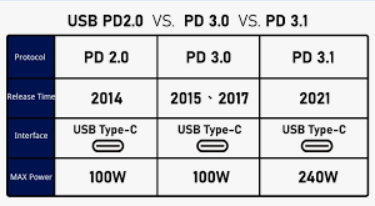
You might be familiar with PPS from PD 3.0—it’s what allows your Samsung or Google Pixel phone to negotiate the exact voltage it needs to charge fast without overheating.
PD 3.1 introduces AVS. It works similarly but at a higher scale. It allows a device to tell the charger, “Hey, I don’t need exactly 48V; give me 42.4V to keep my thermals stable.” The charger can then adjust in 100mV increments. This precision is vital when you’re pumping 200W+ into a device; without it, the heat would be unmanageable.
The Hardware Reality: You Need the Right Cable
Here is the “gotcha” that catches most people off guard: Your old 100W cables will not work for 240W charging.
Because PD 3.1 operates at much higher voltages (up to 48V), the cables require higher-rated capacitors and better insulation to prevent “arcing”—basically, tiny electrical sparks that could jump between pins when you unplug the cable under high load.
How to identify a 240W-ready cable:
- E-Marker Chip: All 240W cables must have a specialized “Extended Power Range” E-Marker chip that tells the charger and the laptop, “I am safe for 48V.” If the chip isn’t there, the system will default back to a lower wattage (usually 60W or 100W) for safety.
- The Logo: Look for the official USB-IF “240W” logo on the packaging or the cable connector itself.
- Physical Thickness: While not a rule, 240W cables are often noticeably thicker and more ruggedized to handle the increased power.
Does Your Device Actually Support 240W?
As of 2026, we are seeing a massive wave of adoption, but it’s important to be realistic. Just because you buy a 240W charger doesn’t mean your iPhone will charge at 240W.
- Laptops: High-end machines like the MacBook Pro (14″ and 16″), high-performance Razer Blades, and Alienware rigs are the primary beneficiaries. Many of these can now hit 140W or more via USB-C, finally matching their proprietary DC barrels.
- Monitors: We are seeing “Single Cable” setups where a 4K monitor powers a beefy workstation laptop through one USB-C cable while also receiving the video signal.
- Smartphones: Most flagship phones still peak between 25W and 45W. A 240W PD 3.1 charger will charge them perfectly fine (and safely), but it won’t be any faster than a standard 45W PD 3.0 charger.
Is It Backward Compatible?
Yes. This is the beauty of the USB standard.
- A PD 3.1 (240W) charger can charge a PD 3.0 laptop, a PD 2.0 phone, and even your old wireless earbuds. It will simply “negotiate” down to the lowest common denominator.
- Conversely, you can use a PD 3.0 charger on a PD 3.1 laptop, but it will charge much slower (or might only “slow charge” while the laptop is off).
The Verdict: Do You Need to Upgrade?
Upgrade to PD 3.1 if:
- You own a high-performance gaming or creator laptop.
- You want one “Universal” charger that can handle everything from your earbuds to your workstation.
- You are buying a new high-end monitor and want to future-proof your desk setup.
Stick with PD 3.0 if:
- You mainly charge a smartphone, tablet, or a thin-and-light ultrabook (like a MacBook Air).
- Your current 60W or 100W setup already fills your battery in a timeframe you’re happy with.
Summary
USB-C PD 3.1 is the final nail in the coffin for proprietary “power bricks.” By more than doubling the power limit to 240W, it has turned USB-C from a “phone charger” into a professional-grade power delivery system. Just remember: to hit those speeds, the charger, the cable, and the device must all speak the PD 3.1 language.