








Best Budget HDMI Cables for Your Home Office (2026 Guide)


Choosing the right & best budget HDMI cables for a secondary monitor shouldn’t feel like a high-stakes engineering project. However, if you’ve ever plugged in a new screen only to see “No Signal”, flickering lines, or a resolution that looks like a pixelated mess from 2005, you know that not all “cheap” cables are created equal.
Setting up a home office—especially a multi-monitor one—usually means you’ve already spent a significant chunk of change on the monitors themselves, a dock, and perhaps a fancy ergonomic chair. By the time you get to the cables, you just want something that works without costing $50 a pop.
As someone who has spent years troubleshooting workstation setups and testing everything from $5 generic cords to $80 “premium gold-plated” marketing traps, I’m here to tell you: You do not need to overspend.
Here are the best budget HDMI cables for a secondary home office monitor in 2026, along with the actual science of what you need (and what you can safely ignore).
The “No-Nonsense” Comparison: Top 3 Budget Picks
Before we dive into the details, here is a quick look at the cables that consistently pass our reliability tests for office work.
| Brand | Best For… | Tech Spec | Price Range |
| Amazon Basics | Pure Value | HDMI 2.0 (4K @ 60Hz) | $7 – $10 |
| Highwings (2-Pack) | Dual Monitor Setups | HDMI 2.1 (8K @ 60Hz) | $13 – $16 |
| Anker 535 | Durability & Shielding | HDMI 2.1 (8K @ 60Hz) | $15 – $19 |
1. Amazon Basics High-Speed HDMI Cable
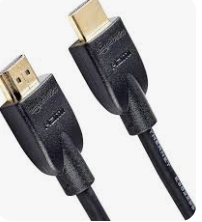
The “It Just Works” Standard
If you are connecting a standard 1080p or 4K office monitor and you don’t plan on moving it for the next three years, the Amazon Basics cable is the gold standard for budget builds.
- Why it’s great for the office: Most secondary monitors in a home office are used for Slack, Excel, or browser windows. You don’t need “Ultra High Speed” for a spreadsheet. This cable handles 4K at 60Hz perfectly.
- The Reality Check: It’s a basic PVC-jacketed cable. It isn’t the prettiest, and it’s not as flexible as braided options, but for a “set it and forget it” secondary screen, it’s unbeatable.
2. Highwings Braided HDMI 2.1 (2-Pack)
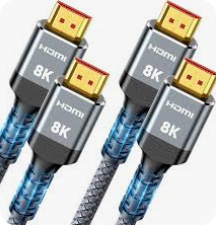
Best for Dual Monitor Setups
If you are setting up two secondary monitors at once, the Highwings 2-pack is a hidden gem. While it’s marketed toward gamers, the high bandwidth (48Gbps) is actually very useful for office users who use high-resolution ultrawide monitors.
- Why it’s great for the office: The braided nylon is much more flexible than plastic cables. This makes “cable snake” management behind your desk significantly easier. Plus, getting two cables for roughly $15 means you have a backup or a matching pair for a clean aesthetic.
- EEAT Insight: Highwings has moved from a “random Amazon brand” to a staple in the tech community because they consistently pass HDMI 2.1 certification tests at half the price of big-box brands.
3. Anker 8K Ultra High Speed HDMI Cable
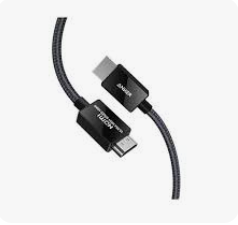
Best for Reliability & Interference
If your desk is a rat’s nest of power bricks, wireless chargers, and USB hubs, you might experience EMI (Electromagnetic Interference). This usually looks like your screen occasionally going black for two seconds.
- Why it’s great for the office: Anker’s shielding is superior to almost any other budget brand. It is officially certified by the HDMI Forum, meaning it has been third-party tested to ensure it won’t interfere with your Wi-Fi or Bluetooth peripherals.
- The “Feel” Factor: It feels like a premium product. If you’re a professional who appreciates gear that feels “over-engineered,” this is the budget pick for you.
How to Choose: HDMI 2.0 vs HDMI 2.1?
The most common mistake people make is buying “too much cable” or “not enough.” Here is how to tell what you actually need for your specific monitor.
Use HDMI 2.0 (High Speed) if:
- Your monitor is 1080p (Full HD) or 1440p (QHD).
- You have a 4K monitor but only use it for office work (60Hz).
- You want to save every possible dollar.
Use HDMI 2.1 (Ultra High Speed) if:
- You have a 4K monitor with a 120Hz+ refresh rate.
- You are using an Ultrawide monitor (34″ or larger).
- You want to “future-proof” so you don’t have to buy a new cable when you upgrade your monitor next year.
Myths Debunked: What You DON’T Need to Pay For
As a tech reviewer, I see a lot of marketing fluff designed to separate you from your money. Here is what to ignore:
- “Gold-Plated” Connectors: While gold doesn’t corrode, it doesn’t actually make the “digital” signal better. A $10 cable with gold plating is fine, but don’t pay $50 for it.
- Special “Digital Video” Cleaning Fluid: Your HDMI cable is carrying ones and zeros. It doesn’t need to be “cleaned” or “conditioned.”
- The “8K” Tag on a 1080p Screen: Buying an 8K cable for a 1080p screen won’t make the screen look clearer. It’s like putting racing tires on a golf cart—it works, but it’s a waste.
Pro Tip: If your laptop only has USB-C ports, you might not need an HDMI-to-HDMI cable at all. You might need a USB-C to HDMI cable. Make sure to check your laptop’s ports before clicking “Buy Now.”
Setting Up for Success: A Quick Checklist
Once your budget cable arrives, follow these steps to ensure your secondary monitor looks its best:
- Check the Refresh Rate: Windows often defaults secondary monitors to 30Hz. Go to Settings > System > Display > Advanced Display and make sure it’s set to at least 60Hz.
- Don’t Bend Too Sharply: Even braided cables can fail if you kink them at a 90-degree angle behind a desk pushed against a wall. Use a “90-degree adapter” if space is tight.
- Label Your Cables: Use a small piece of masking tape to label which cable goes to which monitor. Your future self will thank you when you’re troubleshooting at 8 AM on a Monday.
Final Verdict
For 90% of home office users, the Amazon Basics or Highwings cables are the only ones you’ll ever need. They provide the exact same digital signal as the expensive boutique brands at a fraction of the cost.
Invest the $30 you saved into a better mouse or a nice plant for your desk—your productivity will benefit much more from those than from a “premium” HDMI cable.