



Best Long Distance USB Extension Cables for Meta Quest (2026 Guide)


The Ultimate Guide to Reliable Long Distance USB Extension for VR Headsets (2026)
If you have ever spent an hour untangling cords instead of fighting bosses in Blade & Sorcery, you know the “tethered struggle” is real. While the Meta Quest 3 and Quest 2 offer fantastic wireless play via Air Link or Virtual Desktop, many of us still crave the visual fidelity that only a wired PCVR connection can provide. The problem? The standard 10-foot cables just don’t cut it for room-scale VR.
To get the most out of your setup, you need a long distance usb extension that doesn’t sacrifice data speed or power delivery. But as many VR enthusiasts discover the hard way, not all cables are created equal. In this guide, we’re diving into the science of signal degradation and the best hardware to extend your reach up to 30 feet or more.
Why “Standard” Cables Fail at Long Distances
To understand why you need a specialized long distance usb extension, we have to look at the physics of USB 3.0. Standard copper USB cables are designed for short hops—usually under 10 feet ($3m$).
Once you exceed that length, two things happen:
- Voltage Drop: The power required to keep your Quest charged drops, meaning your headset will die even while plugged into your PC.
- Signal Latency: Data packets start to drop or arrive “late” (jitter), leading to stuttering, frame drops, and even nausea-inducing lag.
For a reliable long distance usb extension in VR, you cannot use a “passive” cable. You must use an active cable or a fiber optic solution.
Top 3 Solutions for a Reliable Long Distance USB Extension
Based on real-world testing within the VR community and the latest 2026 hardware standards, here are the most effective ways to bridge the gap.
1. The Active Repeater Method (Most Affordable)
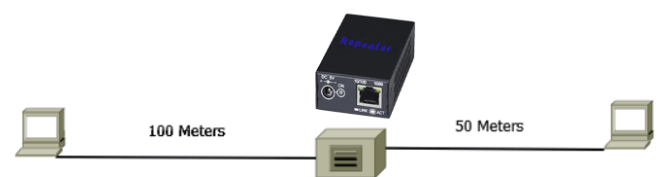
An active long distance usb extension cable contains a small “repeater” chip at the female end. This chip acts like a megaphone, taking the weakened signal from your PC and boosting it before it travels into your headset’s Link cable.
- Best for: Users who already own a 10ft/16ft Link cable and just need an extra 16ft ($5m$) of breathing room.
- Recommended Brand: CableCreation Active USB 3.0 Extension. It’s widely regarded as the most stable “active” option that doesn’t disconnect during high-intensity movement.
2. The Hybrid Fiber Optic Solution (Best Performance)
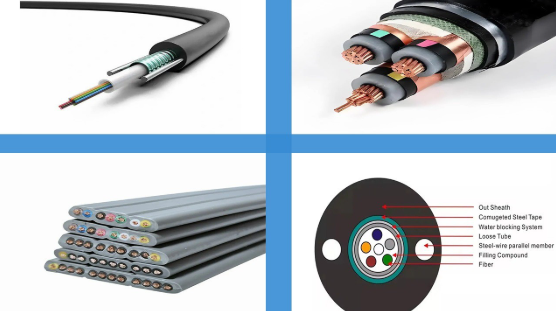
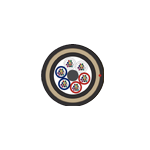
If you want a single-cable solution without daisy-chaining multiple wires, a fiber optic long distance usb extension is the gold standard. Fiber optic cables convert electrical data into light. Light doesn’t suffer from the same resistance as copper, allowing for extremely long runs (up to 60 feet) with zero lag.
- Best for: Professional sim-racers or those with massive “warehouse-scale” play spaces.
- Performance Note: These are thinner and lighter than copper, making them much less noticeable when you’re turning around in VR.
3. The Power-Injected Extension (Best for Long Sessions)
One “dirty secret” of PC motherboards is that their USB ports rarely output enough power to charge a Meta Quest 3 while it’s in use. If you use a standard long distance usb extension, your battery will slowly drain.
- The Fix: Use a cable like the Kuject Design MT005. It includes a separate port for your Quest wall charger, injecting full power directly into the line so you can play for 12 hours straight without the battery dropping.
Technical Specifications: What to Look For
When shopping for a long distance usb extension, use this checklist to ensure compatibility with Meta/Oculus Link:
| Specification | Minimum Requirement | Why it’s Critical |
| Data Protocol | USB 3.0 / 3.1 Gen 1 | Needs $5Gbps$ bandwidth for high-res video. |
| Cable Type | Active (Repeater) | Passive cables over $10ft$ will fail 90% of the time. |
| Amperage | 3.0 Amps | Essential for keeping the headset battery stable. |
| Shielding | Triple-layer / Braided | Prevents interference from other PC electronics. |
How to Set Up Your Long Distance USB Extension for Success
Getting the hardware is only half the battle. To ensure your long distance usb extension stays “green” in the Meta Quest Link software, follow these steps:
- Use the Right Port: Always plug your extension into a USB 3.1 or 3.2 port on the back of your motherboard. Avoid the front-panel ports on your PC case, as they add even more internal wiring (and thus more signal noise).
- Disable Power Saving: In Windows Device Manager, go to “Universal Serial Bus controllers,” right-click your USB Hub, and uncheck “Allow the computer to turn off this device to save power.” This prevents the extension from “sleeping” mid-game.
- Secure the Joint: Where your Link cable meets your long distance usb extension, use a piece of Velcro or a cable clip. If that connection point jiggles while you move, you will get an instant “PC Disconnected” error.
Common Pitfalls to Avoid
Many users try to save $10 by buying a generic “printer extension” and then wonder why their VR headset keeps crashing.
- Avoid Daisy-Chaining Passive Cables: Connecting two 6ft passive cables together does not make a 12ft high-speed cable; it creates a 12ft “dead zone” where the signal dies.
- Check Your Bitrate: If you are using a high-quality long distance usb extension, you should be able to set your Meta Link bitrate to 500Mbps or higher in the Oculus Debug Tool. If the image becomes grainy or laggy, your extension is likely losing data.
Conclusion: Freedom of Movement
A high-quality long distance usb extension is the single best investment you can make for your PCVR setup. It turns a claustrophobic 6-foot circle into a wide-open 20-foot playground, allowing you to actually walk around your digital environment rather than relying on a thumbstick.
Whether you choose an active repeater or a high-end fiber optic line, prioritize data stability above all else. After all, what’s the point of a 50-foot cable if the screen freezes the moment you duck?
