












Thunderbolt 5 vs USB4: Which cable is Best Future-Proof for External GPUs?


Thunderbolt 5 vs USB4
Choosing the right cable for an external GPU (eGPU) used to be simple: you just bought whatever had the Thunderbolt logo. But as we move into 2026, the landscape has shifted. With the arrival of Thunderbolt and the increasingly capable USB4 (Version 2.0), gamers and creative professionals are facing a new dilemma.
If you’re looking to boost your laptop’s gaming performance with an eGPU, the cable you choose is no longer just a “string” connecting two boxes—it’s the literal highway for your data. If that highway is too narrow, your expensive RTX 50-series or RX 8000-series card will sit idle, waiting for data.
In this guide, we’ll break down whether you should invest in the premium Thunderbolt 5 ecosystem or if the more accessible USB4 standard is truly “future-proof” for your setup.
The Bandwidth Bottleneck: Why Your Cable Matters
External GPUs have always struggled with “overhead.” When you plug a GPU into an internal motherboard slot, it typically uses a PCIe x16 connection. eGPUs, however, have historically been limited to the equivalent of a PCIe x4 connection.
- Thunderbolt 3 & 4: Maxed out at 40 Gbps total bandwidth.
- The Problem: Only about 32 Gbps of that was actually available for data (the rest was reserved for video). This created a performance loss of 10% to 20% compared to internal cards.
Enter the new generation.
Thunderbolt 5: The New Speed King
Thunderbolt 5 is a massive leap. It provides a base of 80 Gbps bidirectional bandwidth. Even more impressively, it features “Bandwidth Boost,” which can push up to 120 Gbps to your display if you are daisy-chaining high-res monitors.
For eGPU users, the most important stat is the PCIe throughput. Thunderbolt 5 supports PCIe Gen 4 x4, effectively doubling the data pipeline to 64 Gbps. This drastically reduces the “bottleneck” effect, allowing high-end GPUs to perform much closer to their native potential.
USB4 (and USB4 v2): The Flexible Alternative
USB4 is essentially the “open-source” cousin of Thunderbolt. While USB4 v1 matches Thunderbolt 4 at 40 Gbps, the newer USB4 Version 2.0 matches Thunderbolt 5’s 80 Gbps raw speed.
However, there is a catch: Certification. Thunderbolt 5 requires strict Intel certification—if it has the logo, it must hit those speeds. USB4 is more fragmented; some ports might support the full 80 Gbps, while others might stick to 20 or 40 Gbps.
Side-by-Side: Thunderbolt 5 vs. USB4 for eGPUs
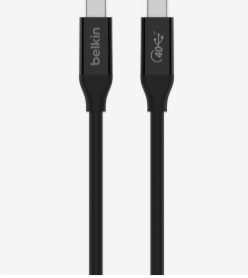
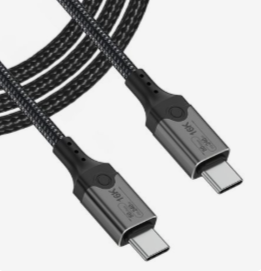
| Feature | Thunderbolt 5 | USB4 (v2.0 / 80G) |
| Max Bandwidth | 80 Gbps (120 Gbps Boost) | 80 Gbps (120 Gbps Optional) |
| PCIe Data Speed | 64 Gbps (Gen 4 x4) | Variable (Up to 64 Gbps) |
| Minimum Power | 140W (Up to 240W) | 7.5W (Up to 240W) |
| Certification | Mandatory & Strict | Optional / Vendor Dependent |
| Best For | High-end RTX 4090/5090 eGPUs | Mid-range setups / Budget builds |
Is Thunderbolt 5 Really “Future-Proof”?
When we talk about being “future-proof,” we are talking about headroom.
- Reduced Latency: Thunderbolt 5 uses PAM-3 signaling, a new way of transmitting data that is more efficient. For gamers, this means lower input lag and smoother frame times—critically important when your GPU is outside the chassis.
- Single-Cable Dream: With up to 240W Power Delivery, a Thunderbolt 5 cable can power a beefy gaming laptop and run the eGPU simultaneously. You can finally have a “one-cable” desktop setup that doesn’t require a separate laptop brick.
- PCIe Gen 4 Support: Most modern GPUs are PCIe Gen 4 or Gen 5. Thunderbolt 4 (PCIe Gen 3) was starting to choke these cards. Thunderbolt 5 finally brings the interface up to speed with the hardware.
The Practical Reality: Do You Need It Today?
While Thunderbolt 5 is technically superior, you have to look at your current hardware.
The Compatibility Check: > To get Thunderbolt 5 speeds, you need three things: A Thunderbolt 5 laptop (look for Intel “Arrow Lake” or newer), a Thunderbolt 5 cable, and a Thunderbolt 5 eGPU enclosure.
If you are using a current-gen laptop with USB4 (like many AMD Ryzen 7000/8000/9000 series laptops), a high-quality certified 80Gbps USB4 cable will give you nearly identical performance to Thunderbolt 5 for a fraction of the price.
Why USB4 Might Be “Enough”
If you are running a mid-range card (like an RTX 4070 or RX 7800 XT), the 40 Gbps limit of older USB4/Thunderbolt 4 ports is noticeable but not always a dealbreaker, especially at 4K resolutions where the CPU-to-GPU communication is less frequent. However, if you plan to upgrade to a “flagship” card in the next two years, USB4 v2 or Thunderbolt 5 is a must.
Final Verdict: Which One Should You Buy?
Buy a Thunderbolt 5 Cable if…
- You own a 2025/2026 high-end Intel laptop.
- You are using a top-tier GPU (RTX 5080/5090 class).
- You want the guaranteed reliability of Intel certification.
- You want to charge your power-hungry laptop via the same cable.
Buy a USB4 (80Gbps) Cable if…
- You are on an AMD-based system (like the ROG Ally, Legion Go, or Ryzen Laptops).
- You are looking for the best price-to-performance ratio.
- You are comfortable checking spec sheets to ensure the cable supports “80Gbps” and not just the base 20Gbps.
Conclusion
The “cable war” is finally reaching a point where external graphics can breathe. Thunderbolt 5 is the definitive future-proof choice because it removes the bandwidth ceiling that has haunted eGPUs for a decade. It’s the “pro” choice for those who don’t want to leave any frames on the table.
However, USB4 v2 is the hero of the masses. It offers the same potential speed but requires a bit more homework to ensure your devices are compatible.
