







DIY Cord Organizer Ideas for a Sleek Minimalist Office – 2026


DIY Cord Organizer Ideas for Your Minimalist Home Office
We’ve all been there. You’ve curated the perfect solid oak desk, invested in a high-end ergonomic chair, and positioned your monitor at the exact millimeter for optimal neck health. It looks like a pinterest board—until you look down.
Behind that sleek setup lies a “cable kraken”—a tangled, dusty mess of power bricks, USB-C cables, and HDMI snakes. In a minimalist home office, visual noise is the enemy of deep work. If your eyes are constantly catching on a chaotic nest of wires, your brain is processing that clutter, whether you realize it or not.
As someone who has spent years perfecting the “lean” workspace, I’ve realized that you don’t need a $200 professional cable management system. With a little DIY ingenuity and a few household items, you can achieve a “floating” tech aesthetic that feels as clean as it looks.
Why Cable Management is a Minimalist Essential
Minimalism isn’t just about owning fewer things; it’s about reducing friction. Mental Clarity: A clean floor and desk surface signal to your brain that it’s time to focus.
- Safety & Longevity: Tangled cords are a fire hazard and prone to internal fraying.
- Easy Cleaning: It’s much easier to run a vacuum or a Swish over a clear floor than to navigate a copper jungle.
1. The “Under-Desk” Command Center (Shoebox Hack)
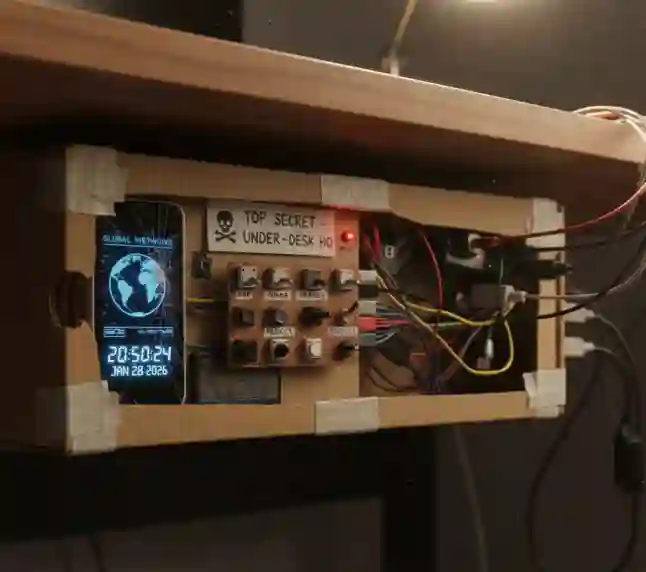
If you have a massive power strip sitting on the floor, it’s the biggest eyesore in the room. The easiest DIY fix? The Shoebox Surge Protector.
How to do it:
- Find a sturdy shoebox (bonus points if it matches your wall color).
- Cut a small hole or slit on both short ends of the box.
- Place your power strip inside.
- Feed the main power cord out one side and the individual device cables out the other.
- Pop the lid on.
Pro-Tip: If you’re worried about heat, use a hole puncher to create “ventilation” dots along the top of the box. It looks intentional and keeps your power bricks cool.
2. Binder Clips: The Unsung Heroes of the Desk Edge
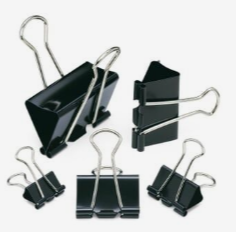
One of the most annoying parts of a minimalist setup is the “sliding cable.” You unplug your laptop, and the charger slides off the desk and disappears into the abyss behind the furniture.
The Fix:
Clip a large binder clip to the edge of your desk. Thread your charging cable through the silver “arms” of the clip before plugging it in. The plastic head of the cable is too large to slip through the loops, keeping your cords exactly where you need them, right at the edge of your reach.
3. The “Loom” Method: Using Spiral Wrap or Old Leggings
Minimalism loves clean lines. Having five separate black wires hanging from a monitor looks messy. Bundling them into one “trunk” looks like intentional design.
- The Upcycle: If you have an old pair of black leggings or a fabric scrap, you can sew a simple “sleeve” with Velcro strips.
- The Result: Instead of five chaotic lines, you have one sleek, fabric-covered column running down the leg of your desk.
4. Toilet Paper Roll Storage (For the “Drawer of Shame”)
Every minimalist has that one drawer filled with “extra” cables—HDMI cables you might need, old micro-USBs, and spare extension cords. Usually, they fuse together into a giant knot.
The DIY Organizer:
- Collect empty toilet paper or paper towel rolls.
- Fold your cables neatly (use the “over-under” technique to prevent internal damage).
- Slip the cable inside the roll.
- Label the outside of the roll (“Printer,” “Camera,” “Spare”).
- Stand them vertically in a box.
This creates a “honeycomb” effect where you can see every cable you own at a glance without ever having to untangle a knot again.
5. Magnetic Magic (The Bottle Cap Hack)
If you have a metal desk frame, you’re sitting on a goldmine. If not, a small strip of magnetic tape hidden under the desk lip works wonders.
The DIY: Glue a tiny neodymium magnet to the end of your most-used cables. When not in use, simply “stick” them to the metal frame of your desk. They stay off the floor, off the desktop, and are ready the second you need them.
The Minimalist Hierarchy of Cable Management
When you’re setting this up, follow this order of operations to ensure it stays clean long-term:
| Step | Action | Objective |
| 1. Purge | Remove every cable you haven’t used in 6 months. | Reduce volume. |
| 2. Group | Bundle cables that go to the same place (e.g., Monitor + PC). | Create “trunks.” |
| 3. Route | Run cables along the legs of the desk using zip ties or Velcro. | Hide the path. |
| 4. Label | Use bread ties or tape to label both ends of every cord. | Future-proof your sanity. |
Experience & Trust
In my years of testing different setups—from expensive “tech-fluencer” cable trays to literal duct tape—the most sustainable systems are always the simplest. The reason DIY ideas often work better than store-bought ones is customization. No two setups are the same; your desk height, the number of peripherals, and the location of your wall outlets are unique.
Safety First: While DIY is great, never “bundle” high-voltage power cables too tightly, as they need a bit of airflow to dissipate heat. If a power brick feels hot to the touch, give it space.
Final Thoughts
A minimalist home office isn’t about hiding the fact that you use technology; it’s about mastering the environment so the technology doesn’t distract you. By spending a Saturday afternoon implementing these DIY cord organizers, you aren’t just cleaning a room—you’re clearing your mental workspace.
The “kraken” doesn’t have to live under your desk. With a few binder clips, some cardboard rolls, and a bit of intentionality, you can finally achieve that “floating” desk look you’ve been dreaming of.
