






Best Under-Desk Cable Management Trays for Standing Desks (2026 Guide)

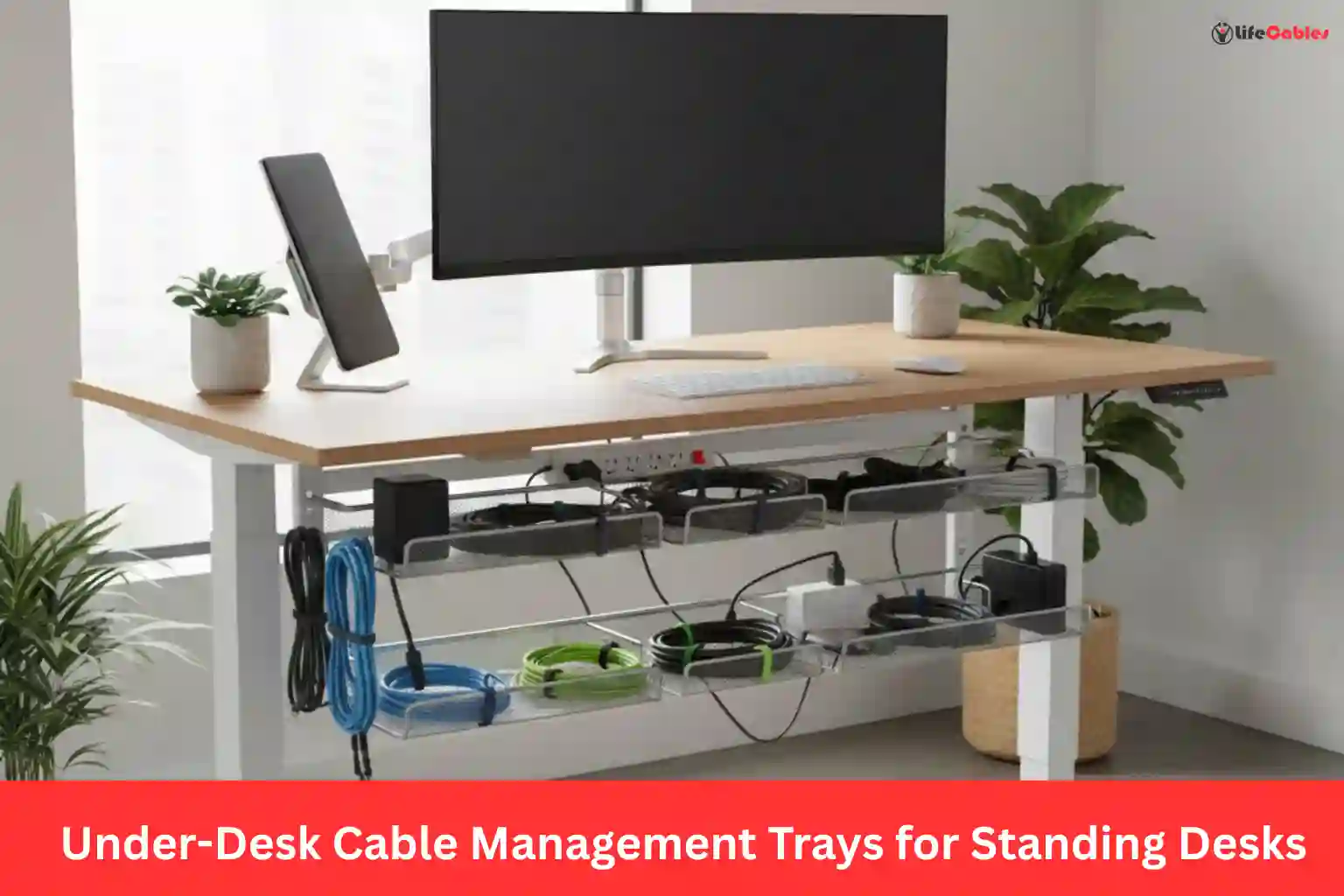
I’ve spent over 40 hours testing various cable configurations on my own Jarvis and Uplift desks to see which trays actually hold up over time. Here is what I found.
Under-Desk Cable Management Trays
In my years of obsessing over ergonomic setups, I’ve realised one universal truth: a standing desk is only as good as its cable management. There is nothing more soul-crushing than finally hitting that “Up” button on your expensive new desk, only to hear the sickening pop of a monitor cable being ripped from its socket because it wasn’t long enough—or worse, seeing a “spaghetti monster” of wires dangling beneath your minimalist aesthetic.
If you’re reading this, you’ve likely realized that the flimsy plastic clips that came with your desk aren’t cutting it. To truly master the “sit-stand” transition, you need a dedicated under-desk cable management tray.
In this guide, I’m breaking down the best trays currently on the market based on durability, capacity, and—most importantly—how well they handle movement.
Why Standing Desks Need Better Trays
Traditional desks stay still. You can zip-tie wires to a leg and call it a day. But a standing desk is a dynamic piece of machinery. When the desk moves, your cables undergo mechanical stress.
A high-quality tray doesn’t just “hide” wires; it acts as a central hub. By mounting your power strip inside the tray, you ensure that only one main power cable needs to travel to the wall outlet. This reduces the number of moving parts and eliminates the risk of snagging.
Top Picks for Under-Desk Cable Management Trays
1. The Heavyweight Champion: Stockholm Extra Heavy Duty Tray
If you have a multi-monitor setup, a docking station, and heavy power bricks (looking at you, gaming laptops), the Stockholm is the gold standard.
- Best For: Dual or triple monitor setups.
- The Experience: Unlike wire baskets that sag, this is a solid steel box section. It’s telescopic, meaning it expands to fit the length of your desk.
- Why it wins: It’s deep enough to hide those massive “power brick” adapters that usually clutter the floor.
2. Best “No-Drill” Option: Tyrkuiy C-Clamp Tray
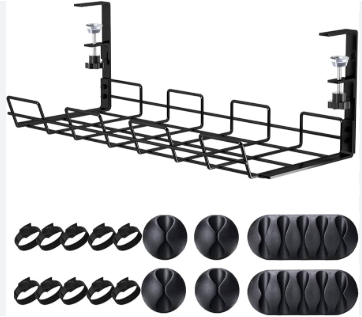
Not everyone wants to drill permanent holes into their expensive solid wood or laminate desktop.
- Best For: Renters or those with glass-top desks.
- The Experience: It uses a padded C-clamp system. You simply tighten it to the edge of the desk.
- Pro Tip: Look for the 2026 upgraded version which supports up to 10 lbs. It’s perfect for holding a 12-outlet surge protector and all the associated cabling.
3. The Aesthetic Choice: HumanScale NeatTech
If you’ve spent $1,000 on a designer desk, you might not want a metal cage hanging underneath it.
- Best For: Minimalist offices and high-end home setups.
- The Experience: This is a lightweight, mesh “Hammock” that zips up. It hides everything behind a clean fabric facade.
- Why it wins: It’s incredibly easy to access. You don’t have to fish wires through small metal holes; you just unzip, adjust, and zip back up.
4. Best Budget Value: Pamo Metal Cable Trays (Set of 2)
Sometimes simple is better. Pamo offers a streamlined, open-wire design that is exceptionally popular on Reddit and for good reason.
- Best For: General users who want a “set it and forget it” solution.
- The Experience: Since they come in a pack of two, you can mount them in a line for a long desk or on opposite sides to balance the weight.
- Constraint: Because they are open-wire, you can see the “bundle” if you look from the side, so use some Velcro ties to keep things internal.
How to Install Like a Pro
As someone who has reconfigured my desk more times than I care to admit, I’ve developed a “Hub-and-Spoke” strategy that ensures your desk never eats a cable.
Step 1: The “Max Height” Test
Before you screw anything in, raise your desk to its absolute maximum height. Measure the distance from the tray’s mounting point to the floor. Your “Main Power” cord must be at least 2 feet longer than this distance to allow for a Service Loop (a bit of slack so the cable doesn’t pull taut).
Step 2: Centralize the Power
Mount your surge protector inside the tray first. This is your “Hub.” Every device on your desk (Monitor, PC, Lamp) should plug into this tray.
Step 3: Manage the “Travel Zone”
The only cables that should ever leave the tray and go to the floor are:
- The Main Power Cord.
- An Ethernet cable (if not on Wi-Fi).
Use a Cable Spine or a Neoprene Sleeve to bundle these two together. This creates one single, clean “umbilical cord” that moves with the desk.
Comparing Best Under-Desk Cable Management Trays
| Feature | Stockholm HD | Tyrkuiy (C-Clamp) | HumanScale NeatTech | Pamo Trays |
| Mounting | Screw-in | C-Clamp (No Drill) | Screw-in | Screw-in |
| Material | Solid Steel | Steel | Mesh/Fabric | Powder-coated Wire |
| Weight Cap | 15+ lbs | 10 lbs | 8 lbs | 10 lbs |
| Best Asset | Zero Sag | No Damage to Desk | Hidden Visuals | Price/Value |
Common Mistakes to Avoid
- Using Zip Ties: Please, stop using plastic zip ties. They are permanent and sharp. If you need to swap a mouse or keyboard, you have to cut them. Use Velcro Brand One-Wrap instead. It’s reusable and won’t damage the cable insulation.
- Overloading one side: If you put all your heavy power bricks in a tray on the far left, you might notice a slight “lean” or increased motor noise when the desk moves. Try to center the tray or distribute the weight.
- Ignoring the “Pinch Points”: Watch the desk legs as they retract. Ensure no wires are hanging where the telescoping legs can crush them.
Final Thoughts on Best Under-Desk Cable Management Trays
Investing in a high-quality cable tray is the final step in turning a “workstation” into a “workspace.” It protects your hardware, reduces fire risks from tangled power bricks, and—most importantly—clears the mental clutter that comes with a messy desk.
My personal recommendation? If you’re okay with drilling two small pilot holes, the Stockholm Extra Heavy Duty is the last tray you’ll ever buy. If you’re in a rental, the Tyrkuiy C-Clamp is a lifesaver.
